
You just posted a Reel. It looks great. The view count keeps climbing. And now you’re sitting there wondering — who actually watched that thing?
Maybe it’s a crush. Maybe it’s your old boss. Maybe it’s someone who blocked you but still sneaks a peek. It’s such a human thing to wonder. And honestly? You’re not alone. Millions of people Google this question every single day.
So let’s get straight to it — no fluff, no waiting.
Can You See Who Views Your Reels on Instagram? The Straight-Up Answer
Instagram does not show you a list of names of people who watched your Reel. Period.
It doesn’t matter if your account is public or private. It doesn’t matter if you have 50 followers or 5 million. No username list exists anywhere in the app.
You’ll see a number — how many times your Reel was played. But the faces and names behind those plays? Instagram locks that away.
This isn’t a bug. It’s not something they forgot to add. It’s a decision Instagram made on purpose, and they’ve stuck to it.
Quick Facts Table
| Feature | Available? |
|---|---|
| See total Reel view count | ✅ Yes |
| See who liked your Reel | ✅ Yes |
| See who commented on your Reel | ✅ Yes |
| See who shared your Reel | ❌ No (only the count) |
| See who WATCHED your Reel | ❌ No |
| See viewer names like on Stories | ❌ No |
| See audience demographics (age, location) | ✅ Yes (Creator/Business accounts only) |
| See followers vs. non-followers ratio | ✅ Yes (Creator/Business accounts only) |
| Third-party apps to reveal viewers | ❌ Not real — all scams |
Why Did Instagram Build It This Way?
Think about how you actually use Instagram.
You scroll through Reels. You watch something funny. You watch it again. You might not like it. You just… move on. You weren’t really “engaging” — you were just existing on the app.
Now imagine if every creator could see your name after every Reel you watched. Would you still scroll as freely? Probably not. You’d feel watched. Judged. Exposed.
That’s exactly why Instagram keeps viewer names hidden. The whole point of Reels is for people to feel free to discover content without feeling like they’re being tracked through a store with security cameras on every shelf.
Instagram also pushes Reels far beyond just your followers. A Reel can land in front of millions of strangers who’ve never heard of you. Showing their names to every creator would feel like a massive privacy violation. People would stop watching. The platform would shrink.
So Instagram made a trade: creators get big numbers, viewers get their privacy. Everyone stays happy.
How Reels Are Different From Stories
Here’s where a lot of people get confused.
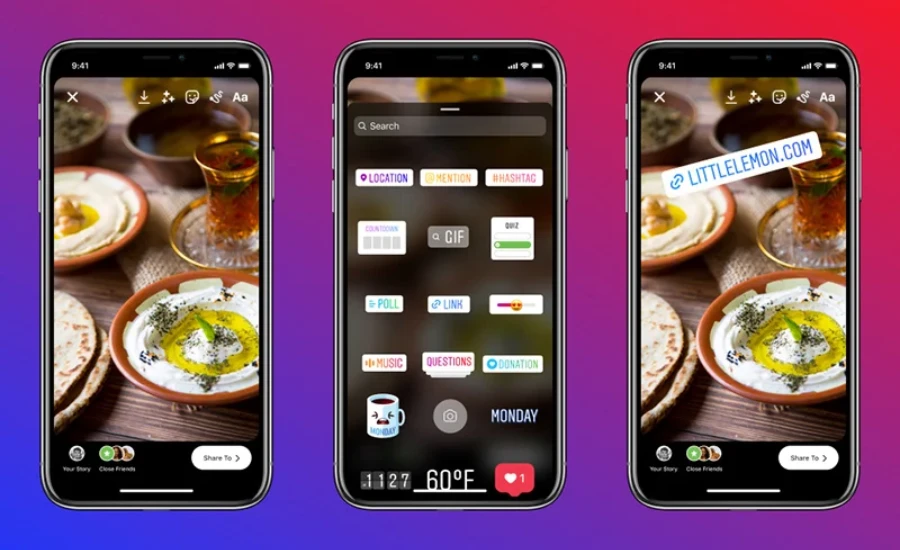
On Instagram Stories, you CAN see who watched. Swipe up on any active Story and a list of usernames appears right there. It feels personal, like a little party where you can see who showed up.
But that window is short. Once your Story disappears after 24 hours, the list goes with it. Even if you save it to Highlights, the names are only visible for about 48 hours from when the Story was originally posted. After that? Gone.
Reels work completely differently. A Reel lives on your profile forever. It can be discovered months or years after you post it. Keeping a live viewer list for a Reel that might be watched 10 million times across five years just isn’t something Instagram does — or plans to do.
Stories are like a dinner party. Reels are like a YouTube video playing in a coffee shop. The vibes are totally different.
What About Instagram Live?
Good question. Instagram Live actually does show you viewer names — but only while the broadcast is happening.
When you’re live, you can see the usernames of people who join in real time. They can comment, wave at you, and you know exactly who’s there.
The moment you end the Live though? That list disappears. Instagram doesn’t save it or store it anywhere you can access. Only the total viewer count stays behind.
So Live is the one place on Instagram where you get real-time viewer identity — but just for that moment.
What CAN You Actually See? (The Insights Breakdown)
Okay, so you can’t see who watched. But you’re not completely in the dark either.
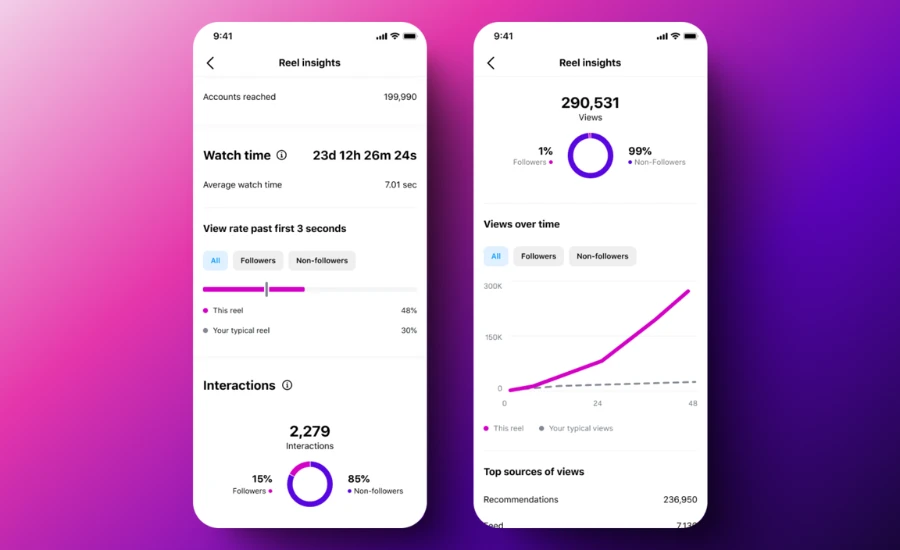
If you switch to a Creator or Business account (it’s free), Instagram gives you a tool called Insights. This is your analytics dashboard. It shows you real data about how your Reel is performing.
Here’s what you can actually see inside Insights:
Views — How many times your Reel was played. One person can count multiple times if they replay it. So this number can be higher than the actual number of unique people who watched.
Reach (Accounts Reached) — This is the better number. It tells you how many unique accounts actually saw your Reel at least once. If your views are much higher than your reach, people are rewatching. That’s actually a great sign.
Watch Time — The total minutes people spent watching your video, including replays. This tells you if your content is genuinely holding attention.
Average Watch Time — How long the average person watched before scrolling away. A short average watch time means you’re losing people quickly. A high one means your content is genuinely gripping them.
Followers vs. Non-Followers — You can see what percentage of your viewers already followed you versus complete strangers. This shows how well Instagram is pushing your Reel beyond your existing audience.
Likes, Comments, Saves, Shares — These are your engagement signals. And here’s the useful part: for likes and comments, you CAN see who did them. So if someone likes or comments on your Reel, their name is visible to you.
New Followers from This Reel — A newer feature Instagram added in 2026. You can now see which specific Reel brought in new followers. Super useful for creators trying to figure out what kind of content grows their account.
How to Access Your Reel Insights (Step by Step)
This only works if you have a Creator or Business account.
From the Reel itself:
- Open Instagram and go to your profile
- Tap the Reels tab
- Tap the Reel you want to check
- Tap the three dots (⋯) in the top right corner
- Tap “Insights”
- All your stats are right there
From the main Insights dashboard:
- Tap the three lines (☰) on your profile page
- Tap “Insights” under For Professionals
- Tap “Content You Shared”
- Filter to see Reels
- Tap any Reel to see its full stats
The full experience is best on mobile. Desktop gives you some basics, but the app version is richer and easier to use.
Does It Matter If My Account Is Public or Private?
Yes — but not in the way most people think.
If your account is public, your Reels can be shown to anyone on Instagram. They appear in the Explore page, the Reels feed, and can be suggested to strangers. This massively expands how many people can watch.
If your account is private, only people you’ve approved as followers can see your Reels. Your reach shrinks significantly, but you have more control over who’s in your audience.
Here’s the important part though: neither setting lets you see WHO watched. Public gives you bigger numbers. Private gives you a smaller, controlled audience. But in both cases, the individual viewer list stays hidden.
Switching to public doesn’t unlock secret features. You still only see counts, not names.
The “Suggested For You” Myth
A lot of people believe the accounts that pop up in “Suggested For You” are people who’ve been secretly viewing their profile or Reels. This idea has been floating around Instagram forever.
It’s not true.
The algorithm that generates those suggestions looks at things like mutual followers, shared interests, people in your phone contacts, and accounts you’ve interacted with before. It doesn’t use a secret list of who watched your content.
The order of your Story viewers also doesn’t secretly reveal who’s obsessed with your profile. Instagram has confirmed that the order is based on your own interaction patterns with those accounts — not how many times they visited your page.
Stop reading into these things. They’re not giving you hidden clues.
Third-Party Apps That Claim to Show You Viewers — Don’t Trust Them
Every few weeks, some new app pops up promising to show you exactly who watched your Reels. They usually have names like “Profile Viewer” or “Stalker Tracker” or something dramatic like that.
Here’s the truth: they’re lying to you.
Instagram’s own API — the system that lets outside apps access data — does not include individual viewer names for Reels. It literally doesn’t exist in the data that Instagram shares. So there’s nothing for these apps to “pull.”
What these apps actually do is one of three things:
- Make up fake names to show you something so you feel like you got your money’s worth
- Steal your login credentials to access your account for malicious purposes
- Harvest your personal data and sell it to advertisers or worse
These apps violate Instagram’s terms of service. Your account can get suspended just for using them. And if you hand over your password, you’re giving strangers the keys to your digital life.
No app can show you Reel viewers. If someone tells you otherwise, they’re selling you something that doesn’t exist.
Smart Ways to Figure Out Who’s Engaging With Your Content
Okay, so you can’t see every viewer. But there are some clever, legitimate ways to get a better sense of who’s paying attention.
Share your Reel to your Story. When someone watches your Story that includes the Reel, you CAN see their name. It’s not a perfect workaround, but it gives you actual viewer names for a 24-hour window.
Ask people to comment. Put a question in your caption. Ask viewers to drop an emoji. Anyone who engages suddenly becomes visible to you.
Watch who consistently likes your posts. If the same person pops up on your likes across multiple Reels, there’s a good chance they’re watching more than they’re liking.
Go Live and invite interaction. When you go Live, you see who joins in real time. It’s a direct connection. It turns faceless viewers into real names.
Use Close Friends for sensitive content. If you only want a specific group to see something, Stories posted to Close Friends give you full visibility into who watched — within the 24-hour window.
What Changed in 2026? New Instagram Features
Instagram made some genuinely useful updates to Insights in early 2026.
The biggest one for creators: you can now see which specific Reel drove new followers. Before, you could only see your total follower growth. Now you can trace it directly to a piece of content. This is huge for figuring out what kind of videos actually grow your audience.
Instagram also added precise engagement timing — you can see the exact second during a Reel when people liked it. Imagine knowing your hook lands at the 3-second mark. You can replicate that every time.
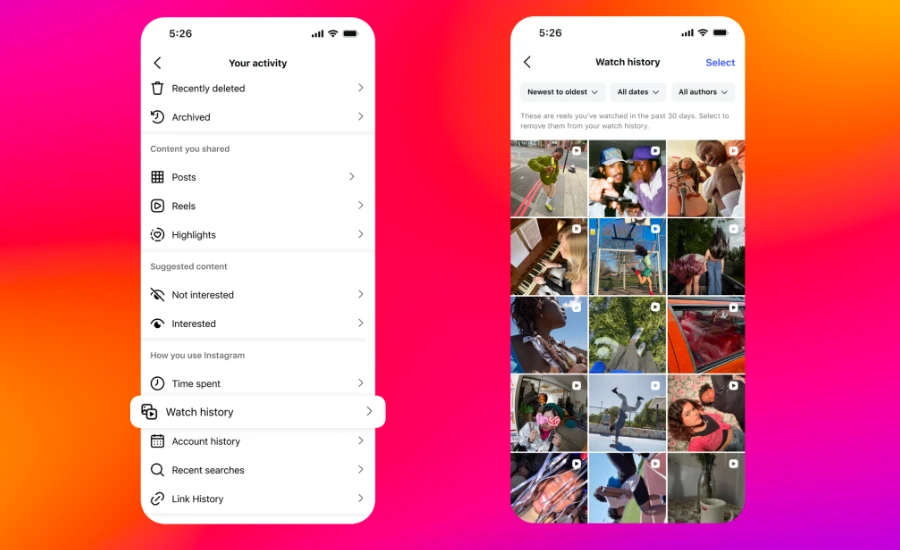
A Watch History feature also started rolling out, found under Settings > Your Activity. This lets users see their own viewing history — content they’ve watched. It’s designed for personal use, not for creators to spy on viewers. But it shows Instagram is thinking more carefully about how people track and understand content.
None of these updates reveal individual viewer names. The privacy wall on Reels hasn’t moved. But the tools for understanding your audience as a group keep getting sharper.
What About Reels You Watch — Can Creators See YOU?
This question makes a lot of people nervous.
If you watched someone’s Reel but didn’t like or comment — they have absolutely no idea it was you. Your view adds to their count, but your name doesn’t appear anywhere on their screen.
Even if you don’t follow them. Even if your account is private. Even if you watched it five times. You are invisible unless you choose to engage.
This works both ways. You’re protected when you watch others, and your viewers are protected when they watch you.
The only exception: if you tap the heart button or leave a comment, your name becomes visible. The moment you interact, you step out of the shadows.
Does Instagram Notify Anyone When You Screenshot a Reel?
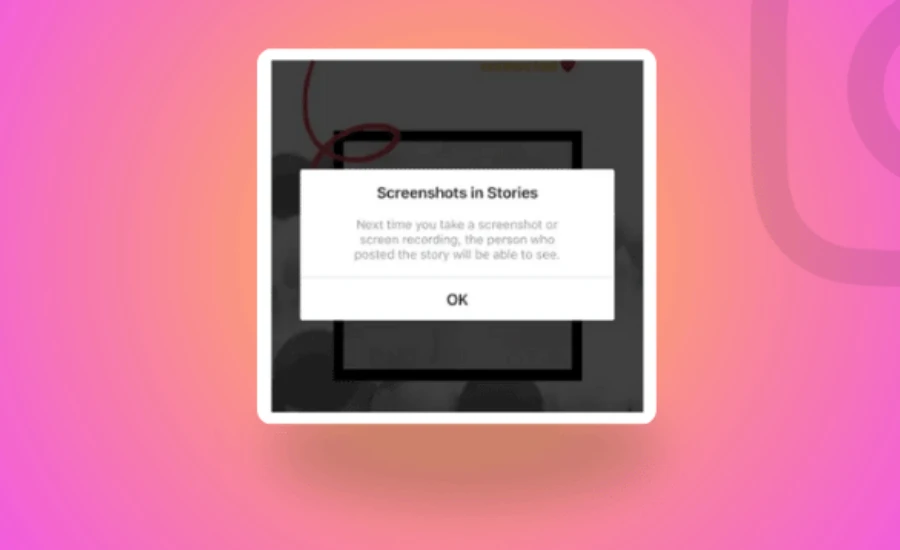
No. Instagram does not send a notification when someone screenshots a Reel. Same goes for regular posts and Stories — no alert goes out.
The only time Instagram sends a screenshot notification is inside a DM chat that has Vanish Mode turned on. That’s it. Everything else? Screenshots are silent.
So if you’ve been saving Reels screenshots, the creator has no idea. And if someone saved a screenshot of yours, you won’t know either.
Privacy Tips If You’re Worried About Who Sees YOUR Reels
Maybe you’re on the other side of this. You’re not the creator. You’re the viewer who wants to stay anonymous.
Good news: you already are anonymous when watching Reels.
But if you want to lock things down further:
- Switch to a private account. Only your approved followers can see your posts and Reels.
- Turn off Activity Status. This hides the green dot that shows when you’re online.
- Use Restrict instead of Block. If someone’s bothering you, Restrict lets you limit their access without the drama of a full block.
- Hide Stories from specific people. You can mute your Stories from certain followers while still posting for everyone else.
These are all built into Instagram’s settings. No third-party app needed.
Final Words
Here’s the bottom line, said simply:
Instagram Reels were built for discovery. They’re meant to reach strangers, go viral, and show up on feeds far beyond your followers. To make that work, viewers have to feel safe watching without being tracked.
So Instagram made a clear choice: viewers stay anonymous, creators get data.
You won’t see names. But you will see numbers — reach, watch time, engagement, follower growth per post. And honestly, those numbers tell you something much more useful than a list of names ever could.
If you want names, use Stories. Use Live. Ask people to comment. Those are the paths Instagram built for visibility.
And if any app ever promises to show you Reel viewers? Walk away. It’s not real. Your account is worth more than that curiosity.
FAQ About Can You See Who Views Your Reels on Instagram
Q1: Can I see who viewed my Reel if I have a business account?
No. A business or creator account gives you richer analytics — reach, demographics, watch time — but the viewer list still doesn’t exist. You’ll see more data about your viewers, but not their names.
Q2: Why can I see Story viewers but not Reel viewers?
Stories and Reels are built for completely different purposes. Stories are short, personal, and expire in 24 hours — they’re built for close connections. Reels are built for wide discovery. Instagram designed viewer visibility for one and anonymity for the other.
Q3: Does someone know if I watch their Reel multiple times?
They can’t see it was you — but the view count does go up each time a Reel is replayed. They’ll see more views than unique accounts, which suggests people are rewatching. But your name is still invisible.
Q4: Can I see who saved my Reel?
No. Instagram shows you how many saves your Reel received, but not who saved it. The identities of people who save content stay private.
Q5: What if someone watches my Reel and then follows me? Will I know?
Yes and no. You’ll get a notification that someone new followed you. But Instagram doesn’t directly tell you “this person followed you because of this specific Reel” — unless you check your Insights, which now shows which Reel drove new followers.
Q6: Can a person see who viewed their Reel on a personal account?
Personal accounts don’t even have access to Insights at all. You can see your view count publicly, but nothing deeper. You’d need to switch to a Creator or Business account to access any analytics.
Q7: Do third-party apps really show Reel viewers?
Absolutely not. No third-party app can access that data because Instagram doesn’t share it. Any app making this claim is either fabricating information or attempting to steal your login credentials.
Q8: Is the order of who liked my Reel meaningful?
The order that likes appear is generally based on when they happened — recent likes show up first. It doesn’t secretly encode information about who watched or how often.
Q9: If someone watches my Reel from a private account, will their name show up?
No. Private or public, the viewer list for Reels doesn’t exist. A private account person’s view is just as invisible as a public account person’s view.
Q10: Can I see if a specific person watched my Reel?
The only way to know a specific person watched is if they engage — like, comment, share, or follow you after watching. There’s no way to confirm if someone only watched without interacting.
Q11: What happens to Reel views after I delete the Reel?
Once you delete a Reel, the video and all its data — views, likes, comments — disappear completely. Nothing is recoverable.
Q12: Does Instagram tell me when someone shares my Reel to their Story?
Instagram shows you the total number of times your Reel was shared, including to Stories. But it doesn’t tell you whose Story it appeared on or who saw it there.
Q13: Will Instagram ever add a Reel viewer list in the future?
As of April 2026, there’s no sign of this changing. Instagram’s direction has consistently moved toward more privacy, not less. Their updates focus on giving creators better aggregate data — not exposing individual viewer identities.
Keep creating, innovating, and inspiring with Content Ideators every day.
